Drag and drop your keys
Drag actions onto keys or encoders, swap assignments and organize layers, macros and behaviors while seeing your physical layout.
Configure your ZMK keyboard visually, compile firmware locally and flash it—all in one desktop app.
Z-MapFlow brings layout editing, firmware compilation and guided flashing into the same workspace. Turn an idea into a key assignment, build the saved configuration and send it to your keyboard with fewer steps between changes.
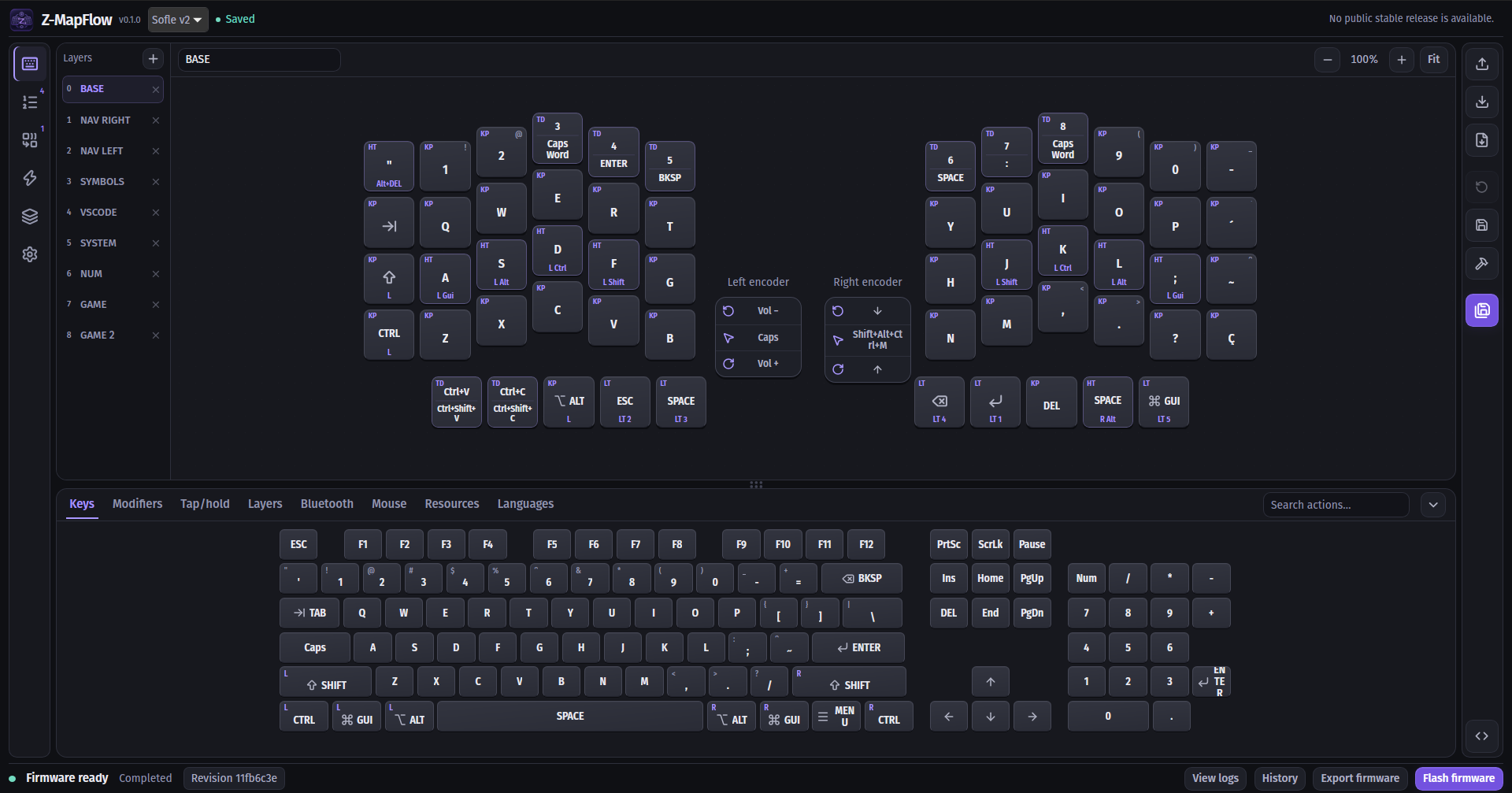
The current editor: layers on the left, your layout in the center, actions in the palette below and save/build controls on the right. Firmware progress, export and flash are available at the bottom.
Install the app, follow the first editing steps, then build and flash your firmware.
Contribute fixes, documentation, translations or a plugin for another keyboard.
Linux x86_64, with Windows x64 builds in initial testing, and Sofle v2 as the first supported keyboard. Windows packages are produced by the updated workflow; older releases may contain Linux only. macOS is planned. Other keyboards can be added through plugins. The interface defaults to English, with Brazilian Portuguese available in Settings → Application. Successful compilation does not replace hardware validation.